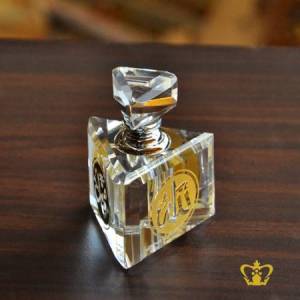
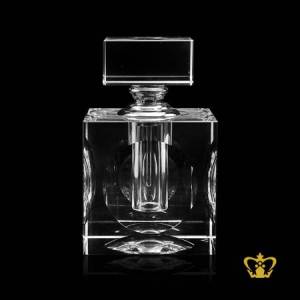
Luminous square handcrafted crystal bottle with modish pattern and s...
PleaseLoginto see the price
Crystal Perfume Bottles Home Shop Homeware Crystal Perfume Bottles Luminous square handcrafted crystal bottle with modish pattern and silver collar an elegan... USD - US DOLLAR AED - UAE DIRHAMS BD - BAHARAINI DINAR CAD - CANADIAN DOLLAR CHF - SWISS FRANC EGP - EGYPTIAN POUND EURO - EURO GBP - STERLING POUND HKD - HONG KONG DOLLAR INR - INDIAN RUPEES IRR - IRANI RIYAL JOD - JORDANIAN DINAR KD - KUWAITI DINAR KES - KENYAN SHILLING MWK - MALAWIAN KWACHA OMNR - OMANI RIYAL QAR - QATAR RIYAL RMB - CHINESE SAR - SAUDI RIYAL SGD - SINGAPORE DOLLAR THB - THAILAND BAHT USD - US DOLLAR Luminous square handcrafted crystal bottle with modish pattern and silver collar an elegant gift souvenir (Product Code:R5410) Shop one of our beautiful crystal perfume bottles in traditional cut, pour the luxury perfume into it and get an amazing original gift for anyone you know. Sparkling beauty of crystal perfume bottle in combination with engaging aroma of essential oils is simply awesome. Delicate patterns inspired by floral motifs decorate the beautiful perfume bottle. Crystal Gallery having wide range of decorative perfume glass bottles, you can personalize it with your name, text, notes or logo. Take a few minutes to browse our selection of perfume bottles, we think you will be pleased with our selection, easy to use shopping cart, low prices and great service. Just choose the one from our wide range of shapes, select your most favorite crystal perfume bottle or sprayer and buy it. ê 288.75 * Customization and special packaging charges will be additional if required Learn more about customization Main Category :Homeware Sub Category :Crystal Perfume Bottles Height: 90.00 Millimeter Capacity : 1.50 Centilitre Weight :0.54 Kg Material Type: LEAD CRYSTAL Unit: PCS Customized packaging: Whatsapp Share Copy Link Send Enquiry Shipping Charge Perfume Bottle Upload Your Photo Click to upload your photo. You selected to attach image, please! The above image is a sample preview, After you place your order we will send you an artwork and only after your confirmation we will start the production. Edit Your photo Free Crop Zoom In Zoom Out Rotate Left Rotate Right Destroy Replace Replace Select Image to Crop Download Cropped Image --> </div> <div class="row"> <div class="col-md-12"> <div id="err"></div> </div> <div class="col-md-6"> <button class="btn btn-primary" id="getDataURL" onclick="setCrop();" type="button" style="display:none;">Crop Image to Preview</button> <textarea id="cst-img-edited" name="cst-img-edited" style="display: none;"class="form-control" rows="10"></textarea> <input class="btn btn-warning btn-cst-edit" type="button" value="Save Edit" onclick="return submitCrop();"> <button class="btn btn-default btn-cst-edit" id="reset" type="button">Reset</button> <input class="btn btn-default btn-cst-edit" type="button" value="Cancel Edit" onclick="hideCrop();" > </div> <div class="col-md-6"> <div id="showDataURL"></div> </div> </div> </div> </div> <div class="clearfix"></div> <div class="col-sm-12" id="result_div"> <div class="col-sm-6" id="edit-imgout"></div> <div class="col-sm-6" id="edit-imgview"></div> </div> <div class="clearfix"></div> <div class="col-sm-12" id="result_div"> <div class="col-sm-6" id="save-imgout"></div> <div class="col-sm-6" id="save-imgview"></div> </div> <div class="col-sm-12 cst-options" id="engTextIntro"> <!--if attachable and rotatable --> <div class="col-sm-12"> <span class="cst-options-head"><br>Engraving Text</span> <span class="cst-options-details"> Choose whether you want to create an individual text, for example, bring in writing a date, a dedication, or just your greetings. </span> </div> <div id="block_optEngText" class="col-sm-6"> <div class="col-xs-6 radio"> <div class="col-sm-12"> <div class="row"> <label><br> <input class="cst-opt" type="radio" name="optEngText" id="optEngYes" value="Y" > Add Text </label> </div> </div> </div> <div class="col-xs-6 radio"> <div class="col-sm-12"> <div class="row"> <label><br> <input class="cst-opt" type="radio" name="optEngText" id="optEngNo" value="N" > No Text </label> </div> </div> </div> <div class="clearfix"></div> <p class="warn-p"> <span class="glyphicon glyphicon-hand-up" aria-hidden="true"></span> Please select any option!</p> </div> <div class="clearfix"></div> </div> <div class="col-sm-12 cst-options" id ="div-eng-text-det" style="display:none;"> <div class="col-sm-6"> <div class="col-xs-6 col-sm-12 eng-txt-cls"> <div class="row"> <div class="col-sm-12 "> Text Alignment </div> <div class="col-xs-12 form-group "> <select class="form-control cstinput" name="selEngLang" id="selEngLang" onchange="configEngFont(this.value);" style="width: 100%; color: #716B6B;"> <option value="English" selected>Left to right</option> <option value="Arabic">Right to Left</option> </select> </div> <div class="col-sm-12" style="display:none"> Font Size </div> <div class="col-xs-12 form-group" style="display:none"> <select class="form-control cstinput" name="selEngSize" id="selEngSize" onchange="configEngTextFont();" style="width: 100%; color: #716B6B;"> <option value="10">10</option> <option value="12" selected="">12</option> <option value="14">14</option> <option value="16">16</option> <option value="16">20</option> <option value="24">24</option> <option value="30">30</option> </select> </div> <div class="col-sm-12" style="display:none"> Font Family </div> <div class="col-xs-12 form-group" style="display:none"> <select class="form-control cstinput" name="selEngFont" id="selEngFont" onchange="configEngTextFont();" style="width: 100%; color: #716B6B;"> <option value="Adobe Garamond Pro" >Adobe Garamond Pro</option> <option value="Arial">Arial</option> <option value="Calibri">Calibri</option> <option value="DJB Zora Prints">DJB Zora Prints</option> <option value="Century Gothic">Century Gothic</option> <option value="Lucida Calligraphy" selected>Lucida Calligraphy</option> </select> </div> </div> </div> <div id="block_txtEngText" class="col-xs-6 col-sm-12 eng-txt-cls"> <div class="row"> <div class="col-sm-12"> <span class="cst-options-head"><br>Your text</span> <span class="cst-options-details">We recommend 200 characters for this cube.However we can fit more characters but then the picture size will be reduced.</span><br> </div> <div class="col-sm-12 form-group"> <textarea placeholder="Enter your text here" rows="4" class="form-control cstinput" title="text" name="txtEngText" id="txtEngText" maxlength="1000" onkeyup="updateLblEngTextChars();" onchange="handleChange('txtEngText');" style="width: 100%; font-family: 'Lucida Calligraphy'; font-size: 12px;"></textarea> </div> <div class="col-sm-12 text-center" id="lblEngTextChars">0/1000</div> </div> <p class="warn-p"> <span class="glyphicon glyphicon-hand-up" aria-hidden="true"></span> Please Enter Your Text!</p> </div> </div> <div class="clearfix visible-xs-block"></div> <div id="block_optEngStyle" class="col-sm-6" style="display:none;"> <div class="col-sm-12"> Engraving Style </div> <div class="col-sm-12"> <ul style="list-style-type: none;"> <li><a data-toggle="tooltip" title=" Crop Image to Preview Reset Engraving Text Choose whether you want to create an individual text, for example, bring in writing a date, a dedication, or just your greetings. Add Text No Text Please select any option! Text Alignment Left to right Right to Left Font Size 10 12 14 16 20 24 30 Font Family Adobe Garamond Pro Arial Calibri DJB Zora Prints Century Gothic Lucida Calligraphy Your text We recommend 200 characters for this cube.However we can fit more characters but then the picture size will be reduced. 0/1000 Please Enter Your Text! Engraving Style "><label><input class="cst-opt" type="radio" name="optEngStyle" id="optEngStyleLaser" value="Laser"> Laser</label></a></li> <li><a data-toggle="tooltip" title=" Laser "><label><input class="cst-opt " type="radio" name="optEngStyle" id="optEngStyleInlay" value="Inlay" > Inlay</label></a></li> <li><a data-toggle="tooltip" title=" Inlay "><label><input class="cst-opt" type="radio" name="optEngStyle" id="optEngStyleUVF" value="UV Print Front"> UV Print Front</label></a></li> <li><a data-toggle="tooltip" title=" UV Print Front "><label><input class="cst-opt" type="radio" name="optEngStyle" id="optEngStyleUVB" value="UV Print Back" > UV Print Back</label></a></li> <li><a data-toggle="tooltip" title=" UV Print Back "><label><input class="cst-opt" type="radio" name="optEngStyle" id="optEngStyleNF" value="Deep Engraving Front" > Deep Engraving Front</label></a></li> <li><a data-toggle="tooltip" title=" Deep Engraving Front "><label><input class="cst-opt" type="radio" name="optEngStyle" id="optEngStyleNB" value="Deep Engraving Back"> Deep Engraving Back</label></a></li> <li><a data-toggle="tooltip" title=" Deep Engraving Back "><label><input class="cst-opt" type="radio" name="optEngStyle" id="optEngStyleRF" value="Reverse Engraving Front" > Reverse Engraving Front</label></a></li> <li><a data-toggle="tooltip" title=" Reverse Engraving Front


 $ 70.76